Stress Test new hardware
All new hardware should be put through a stress test to detect any failing components.
Launch the tests
- Boot into debirf image. If stretch, install pip:
apt install python-pip iperf3 lshw stress-ngand then install stressant:pip install stressant. If later, installstressantinstead ofpip. - Start long smartctl tests on each disk:
for disk in $(cat /proc/partitions | egrep -o 'sd[a-z]$'); do smartctl -t long "/dev/$disk"; done. These will take many hours to complete. - Run stressant:
stressant --logfile /root/stressant.log
Review the results
Wait many hours.
When you return, review /root/stressant.log. Look for… not really sure??
And, run the following to examine the results of the smartctl tests
for disk in $(cat /proc/partitions | egrep -o 'sd[a-z]$'); do echo "$disk" && smartctl -a "/dev/$disk" | egrep 'Reallocated_Sector|Current_Pending_Sector|Reallocated_Event|Offline_Uncorrectable|UDMA_CRC|Runtime_Bad|Reported_Uncorrect|Program_Fail_Cnt_Total|Reported_Uncorrect|Current_Pending_Sector'; done
All values should be 0. If any are not zero, research the attribute and decide whether we should replace the disk before going any further.
In addition, make sure the long test completed without errors:
for disk in $(cat /proc/partitions | egrep -o 'sd[a-z]$'); do echo "$disk" && smartctl -a "/dev/$disk" | grep 'Extended offline'; done
They should all report: “Completed without error”.
Test memory
Boot into memtest (should be available via our Network Boot
setup or if not, simply install the memtest86+ package and reboot the server
and it should be a boot option in grub).
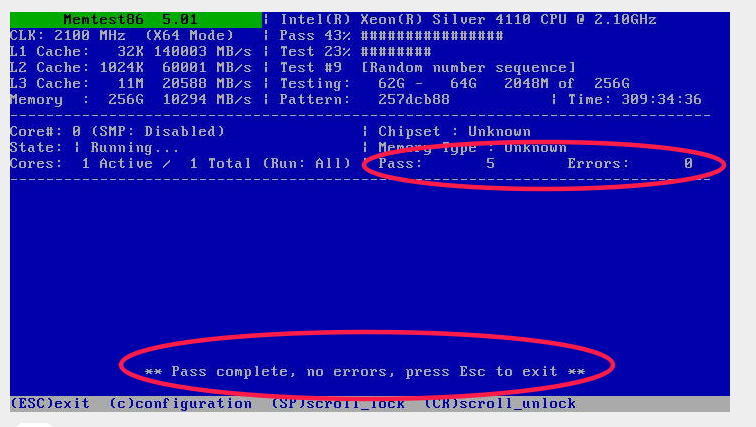
It takes up to a day to run the full memory tests. You should see the errors counter at 0 after 1 full pass.
See below for an example of a successful memtest run.