Postfix
Overview
Postfix sends and delivers our email.
We have several classes of postfix servers:
-
MX: The mx servers accept incoming email destined for an address for which we will take responsibility, runs light validation checks, and relays the email to one of the filter servers. The MX servers are also responsible for verifying MX domains.
A domain will send email to us if it has an MX record pointing to our one of these MX servers.
Typically a domain will designate two or more MX servers to receive email, in case one is down. The record with the lowest “weight” will be chosen first.
We operate three MX servers:
- a.mx.mayfirst.org
- b.mx.mayfirst.org
- c.mx.mayfirst.org
We randomly assign weights for each domain that we setup, to ensure load balancing. We can place and/or move these servers either within our cabinet or outside our cabinet depending on whether we are under DDOS attack or need to manage traffic.
Incoming email messages are put through a series of lightweight checks to reject obvious spammers. This includes the authentication_milter which requires extra work to install.
Note: while it would be better to do all checks and reject email at this stage, some checks (like virus checking) are resource intensive so we do them via the mailfilter servers. For more info on the pro’s and con’s, see the Postfix pro’s and con’s of before-queue content filtering.
Next, they are sent to the mailfilter server. After scanning and tagging, the internal messages are sent directly to the mailstore (or the appropriate mailman server) and the externally destined messages are forwarded to the restricted queue of the mailrelay server, which drops messages over the spam thresshold.
-
Mailfiter: The mailfilter servers (
filter.mayfirst.org) are designed to do the deep filtering of mail content to discard viruses and add spam scores. Once filtered, they send it to one of the routing servers on a relay server (see below). -
Mailstore: The servers are the final destination for email addresses that are handled by May First. The mailstore servers also run dovecot so members can access their email using IMAP or POP.
-
CF: CF, or client facing servers, accept email our members want to relay to others. Typically, members configure their email clients (mobile or destop) to point to the address
mail.mayfirst.orgwhich corresponds to a CF postfix server. The CF servers also run Dovecot which proxies any IMAP or POP connections to the appropriate mailstore server.Postfix is configured to authenticate requests to relay email via Dovecot.
The CF servers send all email to the mailfilter.
Before sending email on the filter servers, the CF servers add a header based on the number of recipients the user has sent in the last hour to indicate whether it should ultimately be passed on the a bulk relay server or a priority relay server.
-
Webstore: Many web sites depend on the ability to send email. Our webstore servers run postfix in a way that automatically relays all email to the restricted instance of the mailfilter server which will forward it on to the restricted instance of the mailrelay server. If you are running a web app that is supposed to send bulk email (e.g. a CiviCRM instance) you can configure the instance to send directly to the bulk server.
-
Relay: Relay servers send email from inside our network to the rest of the world. They accept any email message sent from the filter servers and, in the case of the bulk servers, a limited set of allowed IP address (our web servers). The relay servers run multiple instances of postfix to handle different kinds of relayed email:
-
Route The route servers don’t actually relay email. Instead, they look for the
X-Mayfirst-Relayheader (which is set by the CF servers) and either relay to a priority server, bulk server or filtered server. -
Bulk: The vast majority of instances are bulk instances, allowing us to both limit each IP to just one message per second (to ensure we don’t get blocked as spammers) and still deliver massive amounts of email in parallel.
-
Priority: There are several priority relay instances designed to relay email sent via our client facing (cf) servers. These servers are not supposed to send bulk messages so should have a more stable and solid reputation to improve deliverability.
-
Filtered: The filtered relays receive messages sent by the web servers and email sent by the MX servers that are being forwarded to an external addresses. To avoid forwarding spam and viruses, or to forward email sent by a compromised web site, messages with unacceptable spam scores are silently dropped.
We have an additional page on relay mail servers. The relay servers are in charge of adding dkim signatures to outgoing email.
-
Database files
Our control panel generates and distributes the following files to our postfix servers to guide how email should be delivered:
-
On mx servers,
relay-domainsandrelay-recipientslist every single email address and domain for which we will accept email. In additionvirtual-alias-domainsandvirtual-alias-mapsare used to track domains that are in the process of being verified. -
On filter servers,
virtual-alias-domainslist every domain for which we will accept email. It’s no different from therelay-domainsfile used on mx servers.virtual-alias-mapslists every email address that expands to one or more additional email addresses. It also includes an entry for every email address whose final destination is a May First mailbox. These are listed with the final recipient asuser_acount@hostso they can be picked up by the transport maps.transport-mapslists everyhostaddress and specifies that messages destined for these domains should be transported directly to the host server. All other email addresses are sent out of our network via thefiltered.relay.mayfirst.orgservers. -
On mailstore servers, all recipients are valid unix accounts, so no maps are needed.
Diagrams
Incoming email
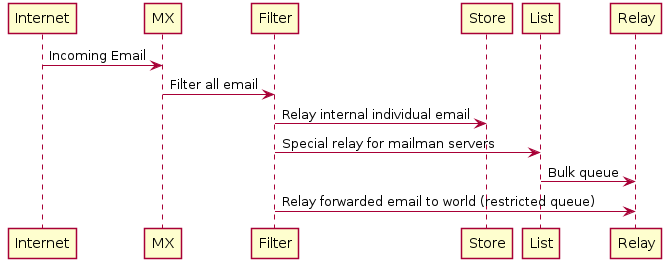
All incoming email gets filtered. Internal email is delivered and external email is relayed but via the restricted bulk relay so we hopefully drop most forwarded spam messages.
Relayed email
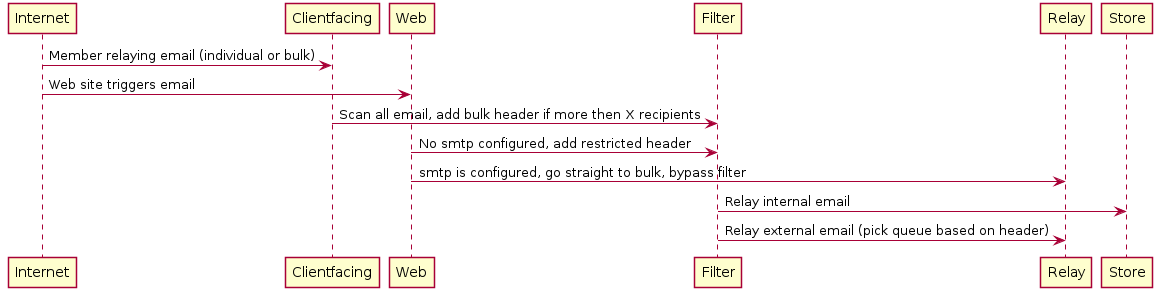
Relayed email is mail that originates with a May First member. It is more complicated because we treat individual and bulk mail differently.
TLS
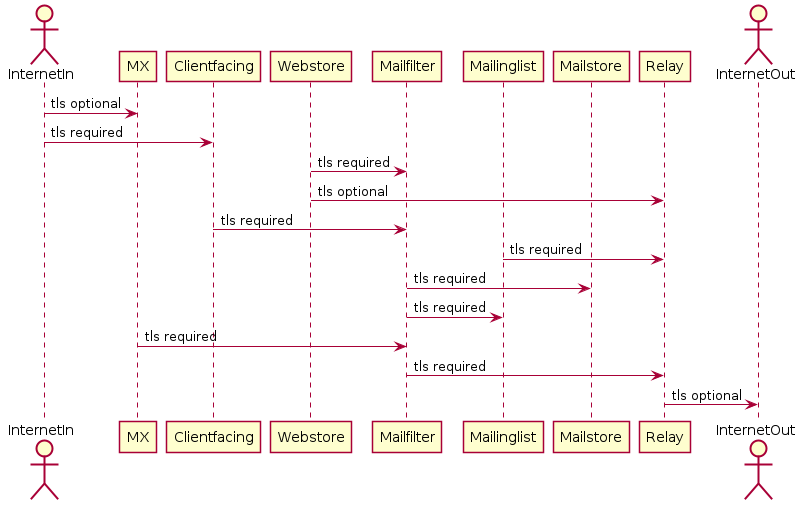
For the most part, with incoming and outgoing email we offer tls but don’t require it (per Internet standards). However, for internal email we require tls so we can relay email between colocation centers safely.
The only exception is sending bulk mail between web servers and our bulk mail server which allows unauthenticated and un-encrypted email for legacy reasons.