Planning
Overview
The planning page maps out the major projects on the horizon and the rough schedule for implementation.
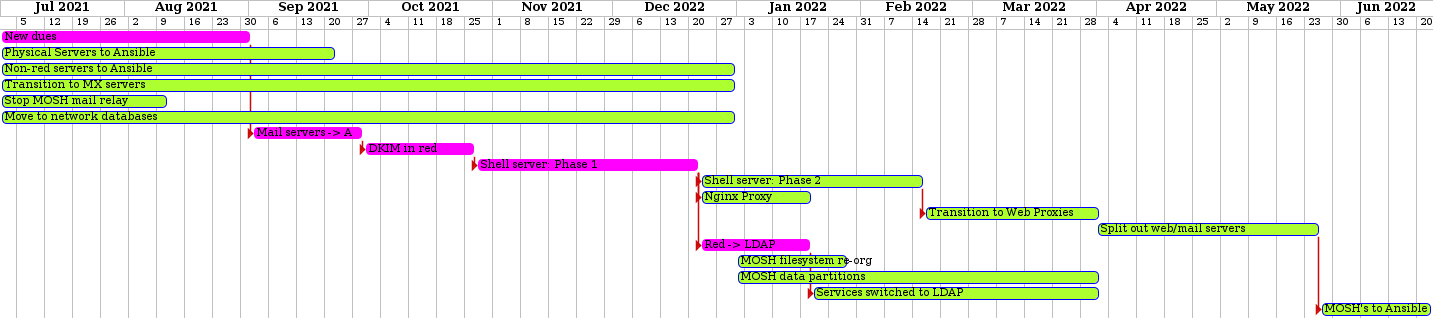
Purple items are items Jamie is taking the lead on.
New dues: Switch from managing dues in our Red control panel to managing them via CiviCRM and implement the new dues schedule.
Physical Servers to Ansible: Transition all physical servers from puppet to ansible and upgrade to buster in the process.
Non-red servers to Ansible: Transition all virtual servers that are not tied to the control panel to ansible and upgrade to buster (or bullseye) in the process.
Transition to MX servers: We already have the ability in the control panel
to setup a domain name to use mx.mayfirst.org (by setting a Mail server
record). We should slowly roll this out to all members, eventually making it
the default setting for new members. In the process we should create new MX
servers via ansible and switch our existing MX server to ansible as well.
Stop MOSH mail relay: A few stragglers still have their email clients
configured with their POP/IMAP and outgoing SMTP servers set to their MOSH
instead of mail.mayfirst.org. We currently limit them to a small number of
outoing messages per day, but this has to be stopped entirely.
Move to network databases: Move all local MOSH databases to our dedicated database servers.
Mail servers -> Ansible: Move cleveland, rustin (bulk mail relay servers) and gil and paulo (POP/IMAP proxies and individual mail relay servers) to ansible.
DKIM in red: Add a new DNS record called “DKIM” that triggers the creation of a DKIM public/private key pair on ranciere (our staging DNS server). Ranciere then inserts the public key into the DNS record and syncs the private keys to our new ansible relay mail servers so all outgoing mail gets signed.
Shell server: Phase 1 Code and prep: This tasks encompasses a number of changes that won’t be made live until the second shell server step below: 1) automate the creation of a new user for each site on a mosh that will own the web site files, 2) setup a dedicated shell server; 3) configure our control panel so that when a “Server Access” record is created, it creates a new shell account on the shell server for the given username, 4) setup a trigger so that when a new shell account is created, the MOSH holding the web site will be updated with the public key of the new server 5) configure each user on the shell server to automount over sshfs the web directory from the MOSH
Shell server: Phase 2 Communicate, educate and transition: This tasks covers the time it will take to send email notifying members of the change, organizing a live session to discuss it, and moving a handful of MOSH’s to test and finally transitioning all MOSH’s.
Nginx Proxy: Setup nginx proxies via ansible and auto generate a map of domain names to MOSH servers by querying the red database over ssh. Each Nginx proxy pulls in a fresh list of domain -> MOSH maps on a 10 minute systemd timer so it can server any web site at any time.
Transition to Web Proxies: Slowly change the DNS entries for all web sites to use these nginx proxies.
Split out web/mail servers: At this point, hosting orders start to lose their meaning because a web site can be on one MOSH, and a user account/email combination can be on another MOSH. So, we should start splitting hosting orders - moving web sites to dedicated web servers and user account/email addresses to dedicated email servers.
MOSH filesystem re-org: Switch from
/home/members/MEMBER/sites/DOMAIN/{web,users} to /home/web/ID and
/home/users/USERNAME.
MOSH data partitions: Move all MOSH data to dedicated partitions, separate from the operating system.
Red -> LDAP: Start sync’ing our red user account database to LDAP and replicating to read-only nodes on each physical server for redundancy.
Services switched to LDAP: Start moving services like XMPP, Nextcloud and Discourse to authenticate against our LDAP server.
MOSH’s to Ansible: Move all moshes to ansible.